
Today at a glance
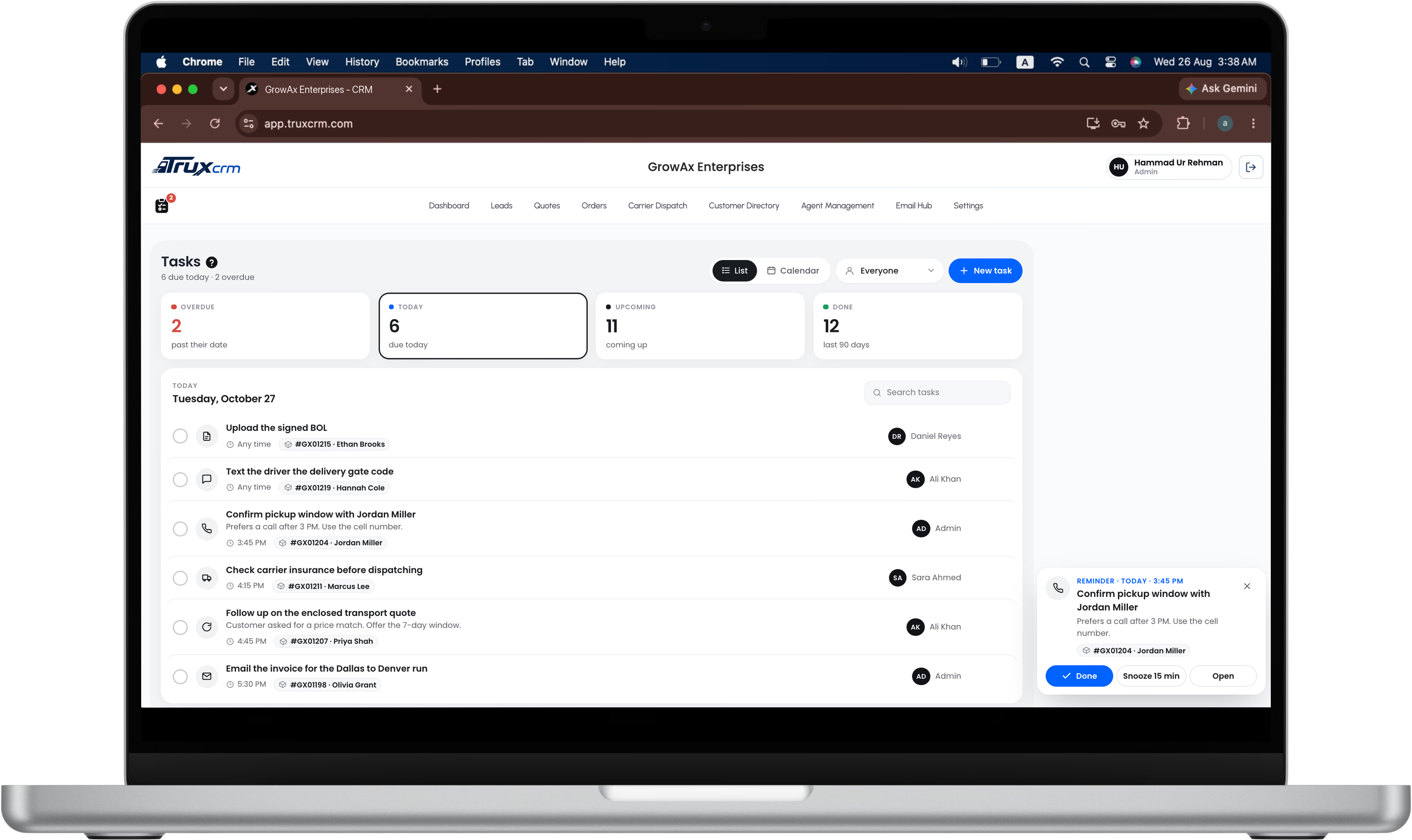
Four numbers at the top: Overdue, Today, Upcoming and Done. Click one to see its list. Tasks are grouped by day, with the time, the linked order and who it's for.

TruxCRM keeps your team's to-do list next to the orders it belongs to. Set a reminder, get it on your phone, and see the whole month at a glance.
Call the customer back after 3, check the carrier's insurance before dispatch, send the invoice, text the driver the gate code. When they live on sticky notes and in people's heads, some get missed, and a missed call can cost a load.
Four numbers at the top: Overdue, Today, Upcoming and Done. Click one to see its list. Tasks are grouped by day, with the time, the linked order and who it's for.
Pick a time and a reminder: at the time, 15 minutes, 1 hour or 1 day before. For tasks without a time, choose 9 AM that morning or 9 AM the day before. A reminder card pops up in the CRM with Done, Snooze 15 min and Open, and a notification reaches your phone or computer when notifications are turned on.
Search an order by number or customer name and attach it to the task. The task then also shows inside that order, and one click on the order tag opens it.
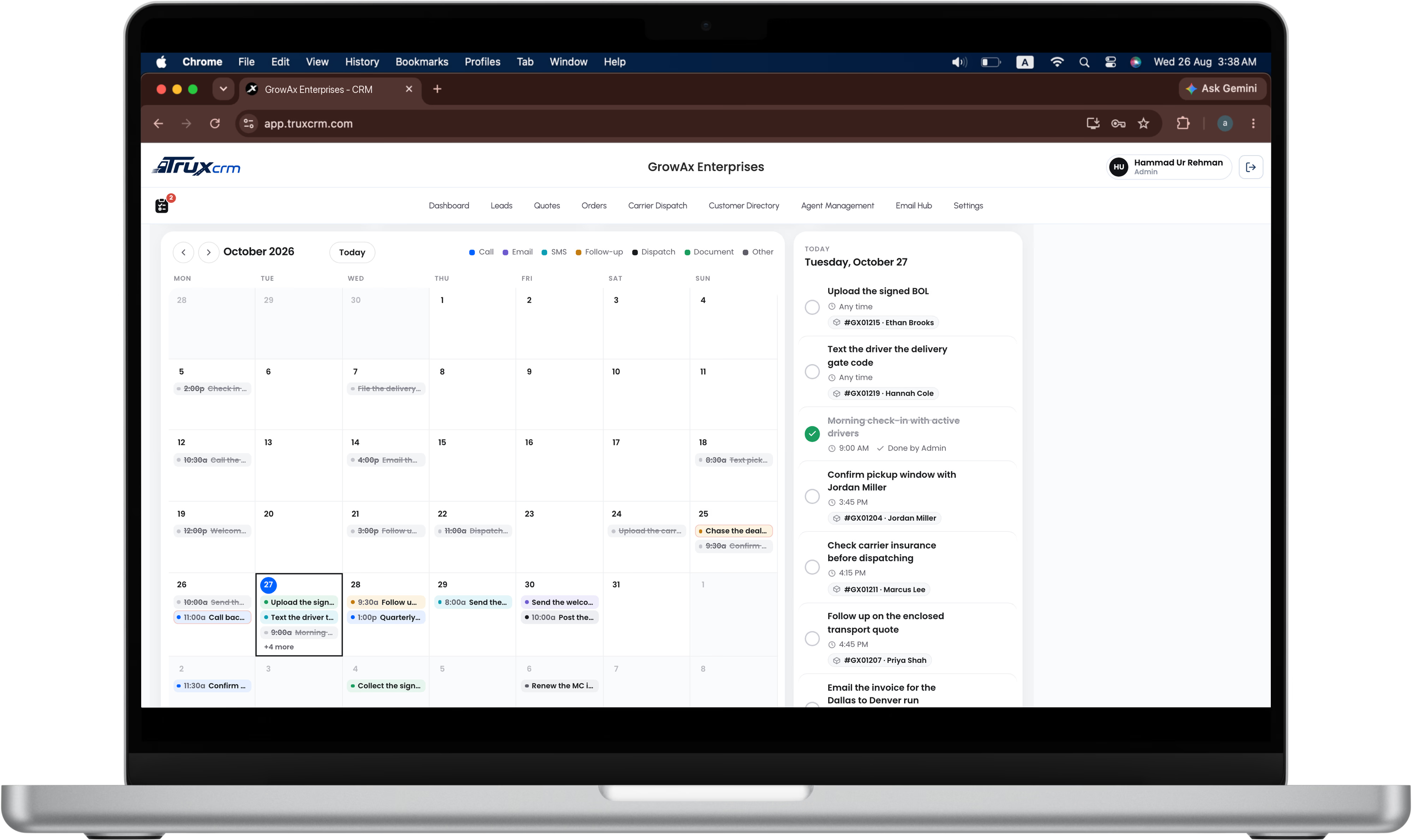
Switch to Calendar to see every task on a month grid, coloured by type. Click a day to see its tasks or add one for that day.
Admins can give a task to any agent; the agent gets a “New task for you” alert. Agents see their own tasks only. The red number on the clipboard icon shows each person how many of their tasks are due today or overdue.
Call, Email, SMS, Follow-up, Dispatch, Document and Other, each with its own icon and calendar colour, so a day's work reads at a glance.
In the Overdue list, admins see how many overdue tasks each person has and can open anyone's list with one click. A task still open 30 days after its date closes itself as Missed, so the Overdue list stays honest instead of filling with old items.
Done and missed tasks stay in Done for 90 days, then clear themselves. Open tasks are never deleted automatically.
Click New task, write what needs doing, pick a type and a date. Add a time and a reminder if it matters when.
Attach the order it's about and choose who should do it.
The reminder appears on screen and on your phone at the time you chose.
One click on the circle moves it to Done.
The Task Manager works on desktop and phone. On a phone, the calendar shows a dot for each task.
The ? next to the Tasks title explains everything in plain words.
Truxie, the built-in AI assistant, can answer “how do I…” questions about tasks.
It's part of the CRM itself, in the same plan as everything else. The pricing page has the full plan.
Yes, if notifications are turned on for your browser or phone. On an iPhone, add TruxCRM to your Home Screen first (iOS 16.4 or later), then allow notifications.
No. Agents see the tasks assigned to them or made by them. Admins see everyone's.
It stays in Overdue for 30 days, where the admin can see who it belongs to. After that it closes itself as Missed and moves to Done, where it can still be ticked off.
Yes. Snooze 15 min on the reminder card brings it back 15 minutes later.
No. Done and missed tasks are deleted 90 days after they close, which keeps your account fast. Open tasks are never deleted automatically.
Book a demo and we'll show you the Task Manager on your own kind of loads.