
Your own accounts, your name on the load
Each company connects its own load board accounts in Settings → Load boards. Loads post under your company name, MC number and rating, not a shared account.

TruxCRM connects to your own Central Dispatch and Super Dispatch accounts. Post a load from the order, follow it from posted to delivered on one board, and never book it twice.
Most brokers post on more than one load board. That means copying every order into each website, checking each one for bookings, and remembering to pull the load from the other board once a carrier takes it. Miss that last step and two carriers show up for the same car.
Each company connects its own load board accounts in Settings → Load boards. Loads post under your company name, MC number and rating, not a shared account.
Every order has Post to CD and Post to SD buttons. TruxCRM fills in the route, ZIP codes, vehicles, carrier pay, payment terms and dates from the order, shows you exactly what will be sent, and lets you adjust the price, dates and notes for that post only.
Change the price or dates and send the update to the same listing. Remove a load from the board when it's covered. TruxCRM keeps track of what is posted where.
Search CD opens the Central Dispatch load board already searching the order's lane, so you can look at similar loads before you set a price.
Send the dispatch to a carrier from the order's Interested Carriers, and see when they accept, pick up and deliver. The Central Dispatch page has the detail.
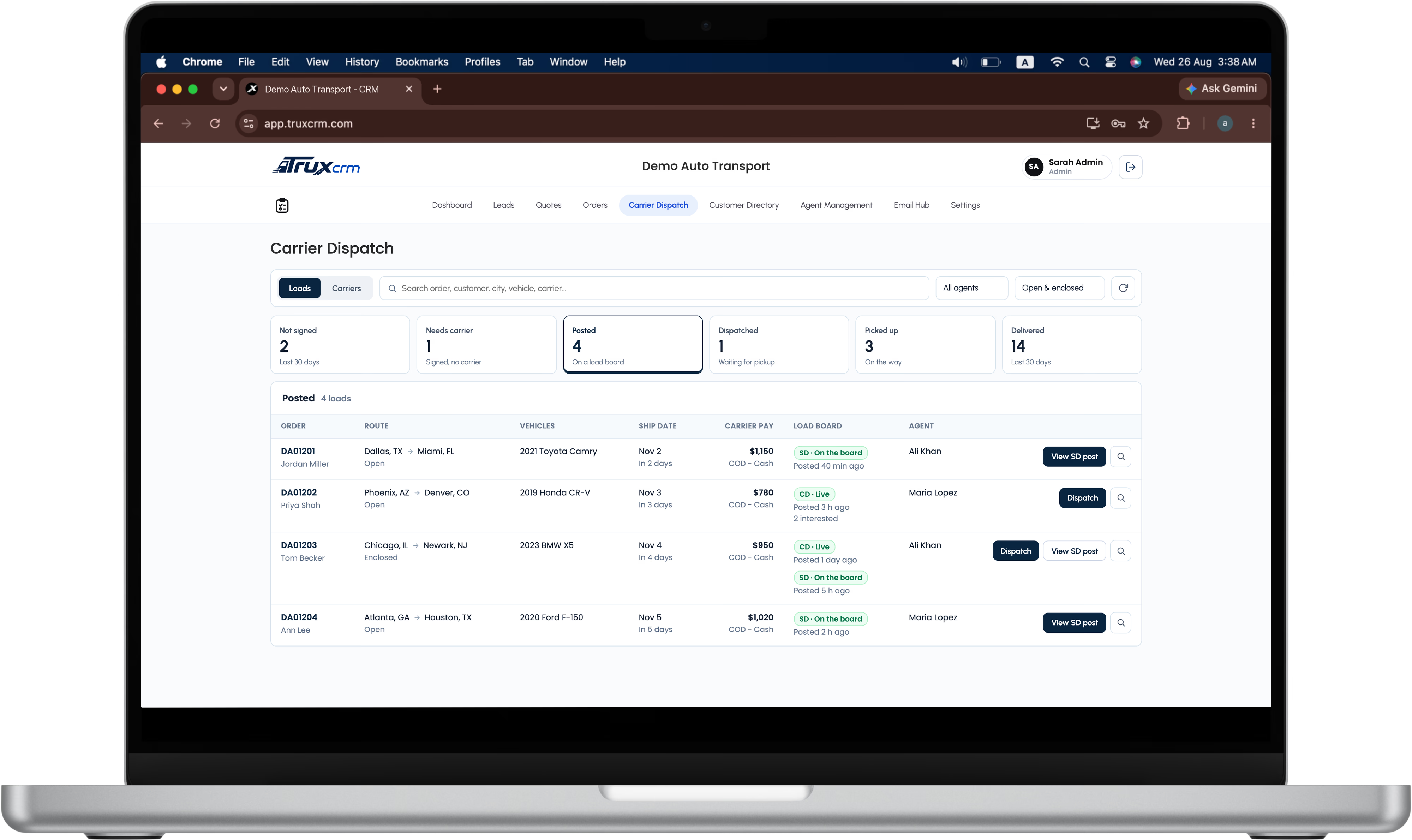
The Carrier Dispatch tab shows every order in its stage: Not signed, Needs carrier, Posted, Dispatched, Picked up, Delivered. Posted loads show which board they're on and when they were posted. Loads booked on Super Dispatch move to Dispatched, Picked up and Delivered by themselves.
The board flags loads that need you: a ship date that has passed, a post that failed, a carrier who declined or canceled, and a dispatch that wasn't sent. One click filters to just those.
When a carrier books a load on Super Dispatch, TruxCRM removes it from Central Dispatch. When a carrier accepts your Central Dispatch dispatch, TruxCRM takes it off the Super Dispatch board. If a removal fails, the notification tells you to do it by hand.
A double click or a slow connection can't post the same load twice. If a board doesn't answer in time, TruxCRM marks the load Needs a check and looks it up before sending anything again.
Switch the board to Carriers to see every carrier you've worked with, grouped by MC number, with how many of your loads they've had and when their insurance expires.

An admin opens Settings → Load boards and connects Central Dispatch, Super Dispatch or both.
Open an order, click Post to CD or Post to SD, check the preview and post.
The Carrier Dispatch tab shows where every load is.
As carriers book, pick up and deliver, the order and the board keep up.
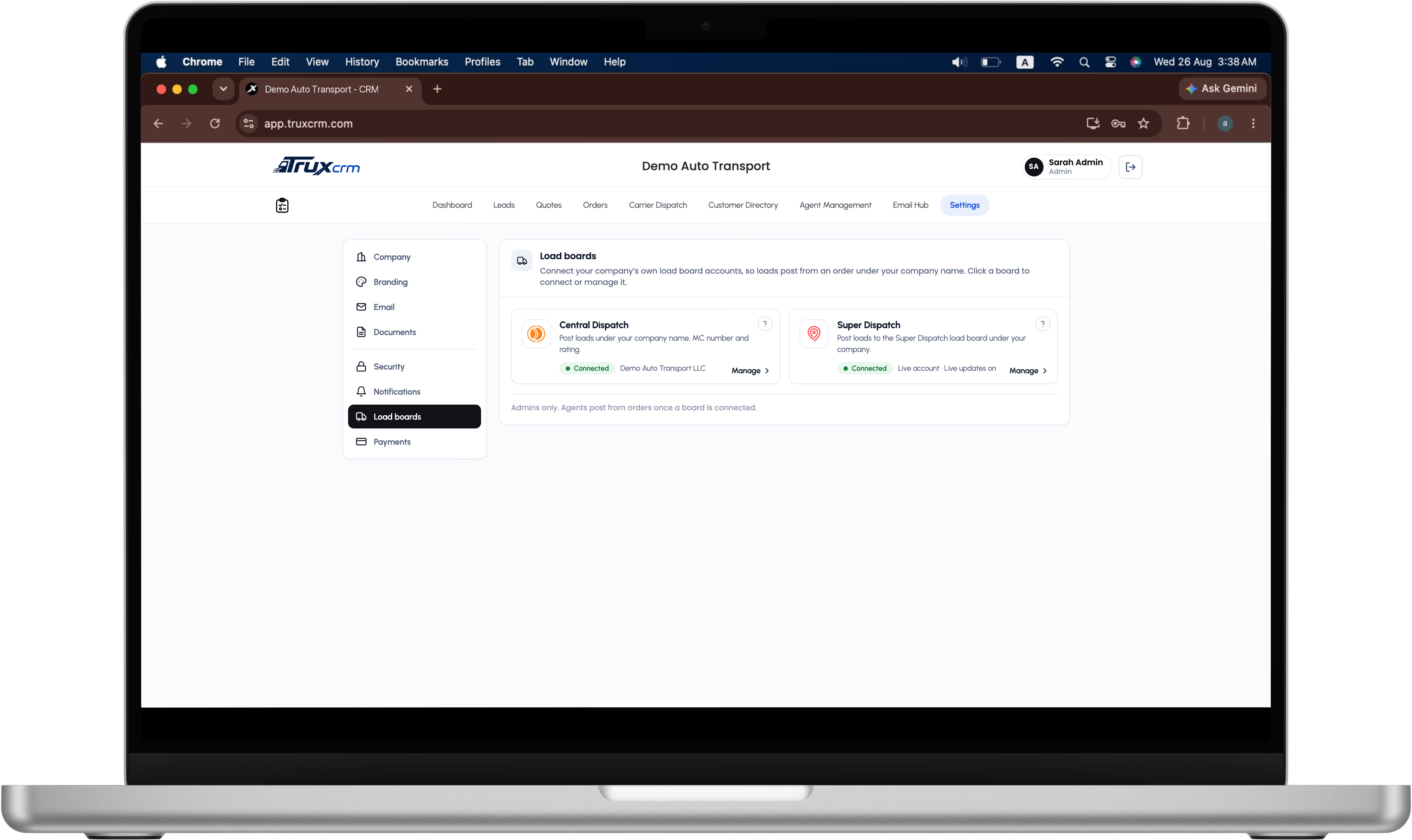
TruxCRM connects to the Central Dispatch and Super Dispatch accounts you already have, one or both.
Post to CD still helps: it opens Central Dispatch's listing page with a panel that copies each field for you.
Admins connect the boards; agents post from orders and see only their own orders on the board.
An order that's still on a load board can't be deleted by mistake.
Every post, update and removal is recorded with who did it.
The board loads 50 orders at a time and searches by order, customer, city, vehicle or carrier, so it stays fast as your book grows.
Central Dispatch and Super Dispatch. You can connect one or both.
Yes. Each company connects its own accounts, and loads post under your company name, MC number and rating.
Yes. When a carrier books it on one board, TruxCRM removes it from the other so it isn't booked twice.
Yes. Price, dates and notes can be adjusted for a single post. The order stays as it is.
No. An admin connects the company's accounts once; agents post from orders in TruxCRM.
Post to CD opens Central Dispatch's listing page with every field ready to copy, so posting by hand is still quick.
Central Dispatch and Super Dispatch are trademarks of their respective owners. TruxCRM is an independent product and is not affiliated with or endorsed by Super Dispatch.
Book a demo and we'll post a sample load to both boards while you watch.